
By Imran Salahuddin | Published on July 10th, 2026 |
Visual Basic 6.0 was the foundation of enterprise computing for decades. It was launched in 1998 and was able to create complex desktop applications for payroll, inventory, and core financial ledgers because of its rapid application development features.
But when you are operating enterprises with VB6, it brings tremendous risk to the operations. In 2008 Microsoft discontinued support of the VB6 IDE. Worse yet, Windows 10 will reach the definite end of life in October 2025, meaning that enterprises are compelled to move to Windows 11. VB6 applications have no native support on Windows 11 and often fail with the latest security hardening. Legacy desktop access using Citrix or RDP is becoming more common as part of regulatory audit non-compliance failures. Moreover, there is almost no more legacy VB6 developer talent left: the average age of a legacy VB6 expert has reached well over 50 years old.
Moving an enterprise VB6 application is not just an easy minor version upgrade. It demands a transition from the outdated Component Object Model to a contemporary object-oriented environment. This guide outlines a no-nonsense, technically sound and fluff-free path to get enterprise systems up and running on modern platforms such as .NET 10 LTS or C#.
Before writing a single line of new code, leadership must determine the architectural destination. Selecting the wrong path can lead to multi-million dollar failures or endless technical debt.
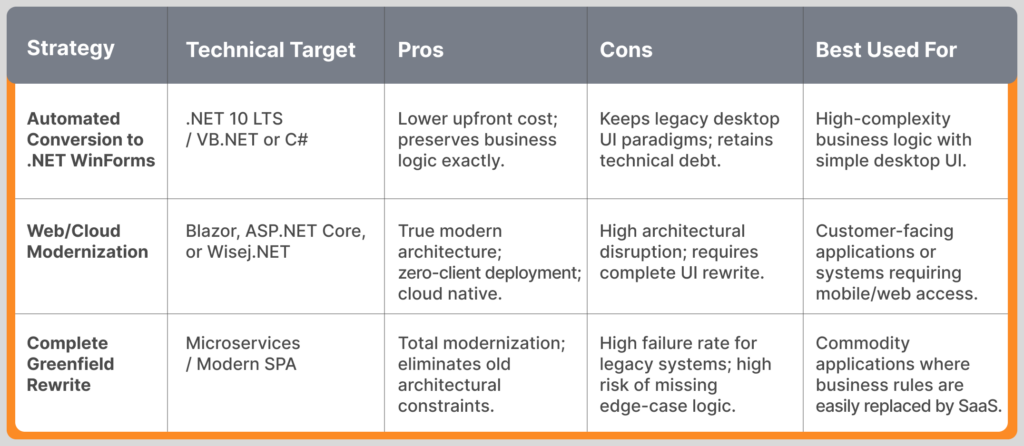
Enterprise Rule: Do not fall into the Greenfield Rewrite Trap unless business processes have changed drastically. Moving to functional equivalence first, followed by re-architecting, continues to be the least risky way to move mission critical legacy software.
Static and dynamic code analysis is the first step in a successful migration. What you don’t know exists, you can’t migrate! Typically, VB6 applications have Dark Tech Debt – undocumented dependency, informal runtime rules.
Use special tools to produce a structural audit, such as the VB6 Bulk Analyzer, NDepend, or the analysis engines of Visual Basic Upgrade Companion. In this phase, it is essential to quantify:
VB6 is very much dependent on 32-bit COM components. Each external reference source must be audited and placed in any one of the three categories:
Legacy applications tend to combine data access technologies in an ad-hoc fashion, with a hash of Data Access Objects, Remote Data Objects and ActiveX Data Objects all competing for the same data. Look for all hardcoded SQL queries, tight coupling to database schemas and where all business logic is located within user interface event handlers.
Never do a big bang code conversion without preparing the source. Clean up VB6 codebase in its native environment.
VB6 is a loose-typed language. A variable with no explicit type will be a variant type with a lot of resources.
A defining trait of VB6 is business logic embedded directly into UI event handlers. Traditional automated conversion tools struggle with this.
This is the execution phase where code translates from legacy syntax to modern syntax.
Modern migration is a hybrid approach of using both specialized rule-based converters and specific Generative AI.
Migration projects are unlike any other and require a high level of QA. Use 35% – 50% of your entire project time only for Quality Assurance.
Once the code compiles in Visual Studio, developers must manually fix the inevitable architectural fractures caused by platform differences.
VB6 is inherently a 32-bit, single-threaded runtime. .NET operates natively in 64-bit environments and handles memory management via non-deterministic Garbage Collection.
When legacy data access code is simply translated, it can lead to dramatic reductions in the performance of the data access, most notably the “query amplification” problem. Allow modern object-relational mappers or high-performance micro-ORMs to replace the old and outdated cursor-based data access model, entirely removing legacy data access model.
Do not perform a hard cutover of an enterprise application that was migrated from VB6. Production condition must be imposed as a test to the system behavior.
Install the new application on top of the old VB6 system. Double feed real production for at least 60 days. Use automated validation scripts to check the outputs (reports, ledger entries, and database updates). When there are differences between the data points, it means there is a bug in the old code base that must be discovered and resolved, or an implicit workflow quirk that needs to be worked out.
Allocation of a realistic, enterprise-level budget to a migration project can’t be spent completely on code translation. The following resource distribution is determined by historical project data:
It is a risk management and disciplined execution process to migrate an enterprise VB6 application. A phased, highly structured conversion roadmap fixes these pitfalls—completely avoiding the risk of a full greenfield rewrite—and allows enterprises to thoughtfully manage security concerns, overcome talent shortages, and manage business-critical logic on a strong and future-proof framework.
Contact us today to start your VB6 migration journey.