How to Test a Classic ASP Application After Migration to .NET
Home / Blogs / ASP / How to Test a Classic ASP Application After Migration to .NET
By Nellaiappan L | Published on September 3rd, 2026 |
Migrating a legacy Classic ASP application to modern .NET is a major win for enterprise scalability, security, and long-term maintainability. The rewrite, however, is just the first part of the process. The ultimate test of success comes at post-migration quality assurance time, when you have to demonstrate that your newly modernized application performs with complete functional parity to the legacy system, but far more quickly, securely and without latent regressions.
Switching from dynamically interpreted VBScript or JScript to a structured, compiled environment creates special testing issues. Data access layers change from legacy ADO to modern data access, handling of variables changes, and the way you manage sessions changes.
This is a complete and practical guide to systematically validating your post-migration application, without the overwhelm of technical code syntax.
Whitepaper—Modernizing Legacy Web Applications with AI: From ASP Classic and ASP.NET MVC to .NET Core and Angular
This whitepaper explores how AI can modernize legacy ASP Classic and ASP.NET MVC applications into .NET Core and Angular while preserving business behavior and enabling automated, screen-by-screen verification.
1. Functional Parity & Business Logic Verification
The core objective of post-migration testing is functional parity: ensuring every business rule, core calculation, and multi-step workflow produces identical outputs across both systems.
Side-by-Side Workflow Comparisons: Execute business actions simultaneously across both environments (legacy Classic ASP on IIS versus modern .NET). Compare system behavior, response output, and status flags step by step.
Data Type & Boundary Testing: Classic ASP handles variables loosely, converting types behind the scenes. .NET enforces strict data typing. Test edge cases, date formats, and numerical inputs thoroughly to catch subtle calculation discrepancies.
Form Submissions & Special Characters: Test the effectiveness of form fields, search boxes, and file uploads when dealing with empty strings, special characters and other multi-language inputs. Modern platforms have more rigid request validation rules than legacy platforms.
2. Session, State, and Authentication Testing
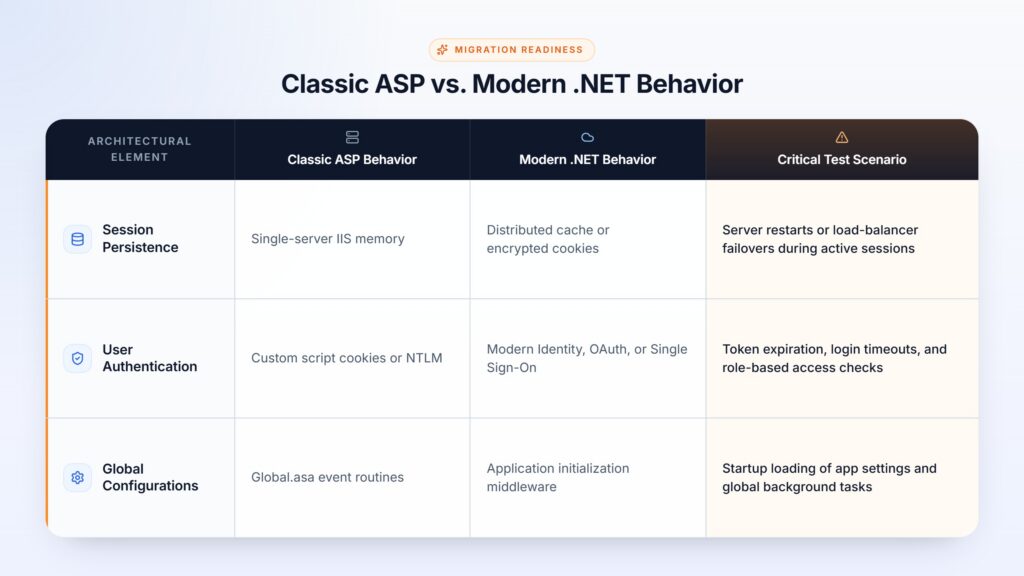
Classic ASP stores user sessions directly within the server process memory, while modern .NET applications rely on secure token management or distributed session stores.
Operational Focus Areas:
Hybrid Coexistence: If legacy ASP pages and new .NET pages run side-by-side during a phased rollout, verify that users transition between both sides without losing their logged-in status or shopping cart contents.
Idle Timeout Behavior: Confirm that user sessions time out properly without leaking server resources or abandoning active database locks.
3. Data Integrity & Database Tier Verification
In-line SQL strings and COM components are used to interact with databases for legacy applications. Modernized .NET systems have been taking the place of these with compiled data mappers and ORM layers.
Query Parity & Report Accuracy: Perform the same search queries, sophisticated filter logic, and financial reporting in both environments, with the same basic data. Ensure there are no discrepancies in terms of paging, sorting order or null value handling.
Transaction Rollbacks: Test multi-step transactions (order processing or user registration etc.). To intentionally cause a failure partway through to assure that .NET also can roll back changes without creating any orphan records.
Procedure Compatibility: Ensure existing stored procedures receive inputs in the exact expected data formats and return consistent record sets.
4. Performance, Load, and Stability Benchmarking
While .NET inherently outperforms Classic ASP, suboptimal architecture conversion can still create unexpected bottlenecks.
Response Time Baselines: Obtain response times for primary user journeys during baseline traffic. Work towards a significant improvement on key pages.
Resource Utilization Under Load: Perform load simulation of users using performance monitoring tools. Monitor CPU usage, memory usage and the performance of the thread pool for stability during intensive workloads.
Connection Management: Make sure background connections open up, run, and close properly so that system resources are not depleted over long periods of time.
5. Security & Vulnerability Auditing
Legacy Classic ASP codebases are notoriously susceptible to security vulnerabilities like SQL injection and Cross-Site Scripting (XSS). While modern .NET includes built-in protective features, active QA testing is mandatory.
Input Sanitization: Validate that all user input fields properly sanitize input before processing or displaying data on screen.
Access Controls: Test restricted endpoints to confirm that unauthorized users cannot view protected administrative pages simply by altering URLs.
Security Headers & Tokens: Verify that modern security headers and anti-forgery mechanisms are active across all form actions.
The Expertise Behind Successful Migration
The secret to a successful migration is in the expertise. To do a complete legacy modernization, you must have experience with legacy web architectures as well as enterprise architectures. Working with established experts in legacy migrations such as Innovatix Technology Partners offers companies a clear, risk-minimized conversion roadmap supported by time-tested automated processes and comprehensive QA protocols. For complete legacy modernization services, check out Innovatix’s ASP to .NET Migration Solutions.
6. Pre-Launch QA Checklist
Before giving final sign-off for production deployment, complete this quality checklist:
End-to-End User Journeys: Test all major user journeys from login to completion.
Cross-Browser & Mobile Testing: Test page layouts and interactive features on all the desired web browsers and mobile viewports.
Log & Error Monitoring: Audit system logs to ensure that non-critical errors and background exceptions are detected and corrected.
Rollback Readiness: Ensure deployment rollback procedures are well documented and tested in case of unforeseen situations after deployment.
A structured testing process ensures that your modernization project is more than just a replacement for old software—it’s an enterprise application that is faster, more secure and more resilient.
Whitepaper—Modernizing Legacy Web Applications with AI: From ASP Classic and ASP.NET MVC to .NET Core and Angular
This whitepaper explores how AI can modernize legacy ASP Classic and ASP.NET MVC applications into .NET Core and Angular while preserving business behavior and enabling automated, screen-by-screen verification.
Nellaiappan is the Application Delivery Manager for Innovatix’s .NET migration team. Subsequently, Nellai leads the Migration Service to migrate client legacy systems to the latest technologies such as .NET. As a PMP certified professional, he has received accolades from clients for his efficient leadership. Incidentally, during his first migration project, Nellai accelerated the migration resulting in a new service offering from Innovatix Technology Partners. Later, Nellai worked on an array of proprietary migration tools that form the backbone of the Migrations Practice at Innovatix Technology Partners.
Nellaiappan holds a Masters in Computer Applications and has 17+ years experience in developing and leading Windows and Web based Applications using Microsoft Technologies.