By Imran Salahuddin | Published on September 24th, 2026 |
Modernizing a legacy application does not have to mean replacing everything at once. For many organizations, the bigger question is more practical: the system still works, users trust it, and the business depends on it every day, so how can the organization reduce long-term risk without disrupting what already works?
That is the real challenge of legacy modernization. A 20- or 30-year-old business application may continue to support critical operations, but aging technology creates increasing exposure over time. Security vulnerabilities become harder to address. Vendor support disappears. Skilled resources become difficult to find. Integrations become more expensive. Compliance expectations continue to rise. Eventually, the risk is no longer whether the application works today, but whether the business can safely depend on it for the next five to ten years.
A phased modernization approach gives organizations a controlled way to reduce these risks while preserving operational continuity. Instead of attempting a high-risk “big bang” replacement, the business can move one capability at a time, validate results, train users, reconcile data, and make informed go/no-go decisions before expanding the migration scope.
Industry research reinforces why this approach matters. Ensono’s 2025 State of IT Modernization report found that many IT leaders underestimated the true cost of keeping legacy systems running, and that organizations continue to struggle with skills availability for modernization programs. These findings reflect a common business reality: doing nothing may appear safer in the short term, but the hidden cost of maintaining outdated systems often increases every year.
The objective of phased modernization is not to disturb a working business system. The objective is to reduce long-term risk while preserving the business behavior, data, workflows, and operational knowledge that made the existing system valuable in the first place.
A legacy application that still works should not automatically be replaced. Stability has business value. Users understand the system. Processes are built around it. Exceptions and workarounds may be deeply embedded in daily operations. In many cases, the legacy system continues to perform its original function effectively.
A mature modernization proposal should therefore avoid two extremes. It should not recommend replacing everything immediately just because the technology is old. It should also not ignore growing risk simply because the application still runs. The right approach is to assess risk, preserve value, and modernize in controlled phases.
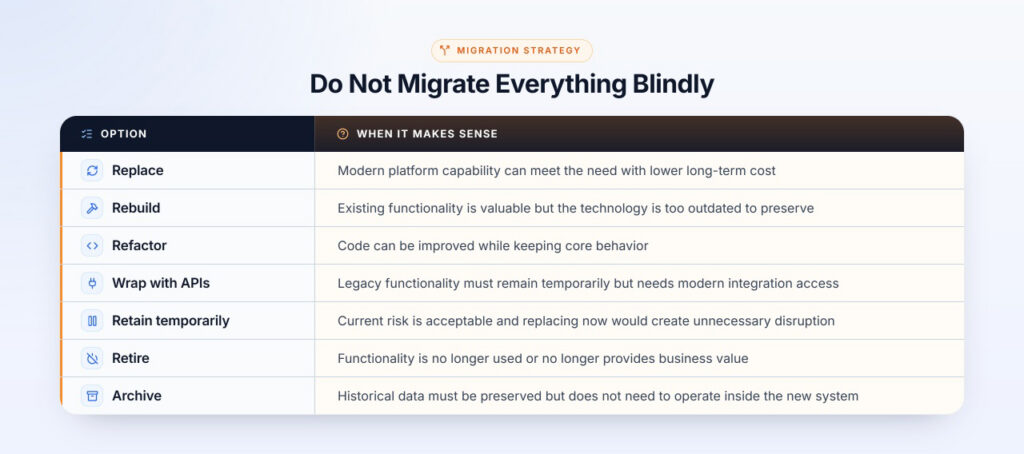
The first phase should establish a clear understanding of the current environment before replacement work begins. This includes technical discovery, business discovery, data discovery, and operational discovery. The assessment should produce a modernization inventory, dependency map, risk profile, and prioritized roadmap. It should also help leadership determine whether each part of the system should be replaced, rebuilt, refactored, wrapped with APIs, retained temporarily, archived, or retired.
For a long-running business application, undocumented business rules are often the greatest modernization risk. These rules may be embedded in application code, database procedures, reports, user habits, exception handling, or operational workarounds developed over many years. A dedicated discovery workstream should capture rules from legacy source code, stored procedures, validation logic, reports, support tickets, user interviews, exception handling, and historical data patterns.
This discovery should produce a business-rule inventory, rule ownership matrix, validation scenarios, and approval checkpoints with business owners. Business users should validate whether the new system behaves correctly under normal, exception, and edge-case conditions.
The first modernization phase should be meaningful enough to prove value but controlled enough to limit risk. Good candidates have clear business ownership, manageable dependency complexity, measurable value, representative business rules, limited production risk, available users for validation, and data that can be reconciled. A pilot phase should establish standards, architecture, governance, testing approach, training model, and rollout discipline for later phases.
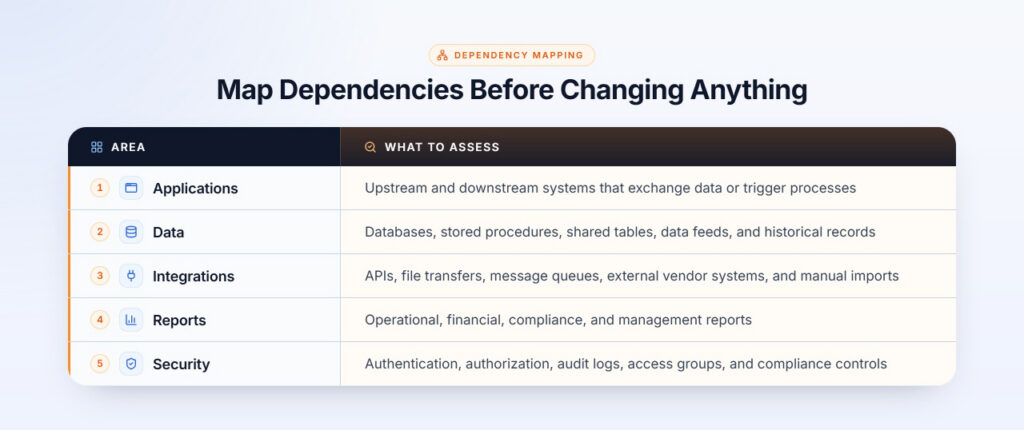
A phased strategy becomes easier when there is a clear boundary between the legacy and modern environments. API layers, service interfaces, shared authentication patterns, data synchronization jobs, read-only legacy data access, event-based integration, and temporary bridge services can allow modernized capabilities to operate alongside legacy functionality without requiring the entire system to be replaced at once.
Data migration is not only about moving data from one database to another. The business must decide what data should move, what should be archived, what should remain available in read-only legacy access, how data will be cleansed, how fields will be mapped, how historical records will be preserved, and how reconciliation reports will prove accuracy. Rollback or re-run procedures should also be defined before cutover.
Testing should not be saved for final cutover. Every modernization phase should include functional testing, business-rule testing, data reconciliation, integration testing, security testing, regression testing, report comparison, performance testing, user acceptance testing, and operational readiness testing. The key question after every phase should be: did the new component preserve the behavior the business depends on?
During a parallel run, selected users, transactions, reports, or business processes are executed in both the legacy and modernized environments. The results are compared before full production transition. This helps validate business-rule accuracy, calculations, reports, data migration, integration behavior, user workflows, exception handling, security access, and support readiness.
A phased modernization proposal should include rollout and training as core workstreams. The plan should define pilot users, role-based training, communications, user guides, support readiness, feedback collection, super-user networks, fallback processes, and department-wise or location-wise rollout waves. Users should participate in workflow validation and receive training before each phase reaches production.
Phased modernization requires executive sponsorship, business ownership, technical architecture leadership, data migration ownership, security and compliance review, QA ownership, UAT ownership, change control, and steering committee oversight. Each phase should end with a formal decision to continue, pause, adjust scope, extend parallel run, roll back, or expand rollout.
Security is one of the strongest reasons to modernize a legacy application that otherwise appears to work. A proposal should address unsupported platforms, known vulnerabilities, authentication and authorization improvements, role-based access controls, encryption, audit logging, secrets management, compliance requirements, vulnerability scanning, secure deployment practices, monitoring, and incident response readiness.
Modernization success should be measured by whether the business is safer, more agile, and better positioned for the future. Useful measures include reduced technology risk, reduced dependency on scarce legacy skills, improved security posture, improved compliance readiness, faster enhancement delivery, better integration capability, improved reporting and data access, reduced manual workarounds, user adoption rate, defect rate after rollout, data reconciliation accuracy, and support ticket volume after go-live.
Phased legacy modernization is most effective when it respects both realities: the legacy system still supports the business, and the risks of staying on old technology continue to grow. The strongest programs combine assessment, business-rule discovery, dependency mapping, controlled integration, data migration planning, parallel validation, user training, governance, and measurable exit criteria.
For enterprises modernizing complex legacy environments, the goal is not to replace everything at once. The goal is to move one controlled capability at a time while preserving business behavior, validating data, preparing users, reducing operational risk, and maintaining confidence in the system as a whole.
Innovatix Technology Partners supports phased legacy modernization across technologies including Classic ASP, Visual FoxPro, VB6, AngularJS, Java, C++, and other legacy platforms, with migration paths to .NET, Angular, cloud-native architectures, and modern integration models. Our approach helps organizations reduce legacy risk while preserving the business rules, workflows, data, and operational continuity that existing systems support.