
By Imran Salahuddin | Published on October 23rd, 2026 |
A legacy application isn’t always worth trying to migrate into a modern platform, sometimes it is just time to pull the plug and move on. There are cases where the most practical thing to do is not to mess with it but rather to retire it, replace the functionality with something else that is already up and running, or merge it into another application that does the same thing.
The challenge is knowing when to cut the losses and admit that a particular application just isn’t worth the money to keep going. Gartner identifies retiring an application is one of the important strategies for reducing technical debt that is building up and at the same time they are very clear that one must think about data retention, business access, and compliance requirements.
For organizations planning legacy application migration, the first step should be to figure out whether the application needs to survive in its current form at all.
An application might be ticking along just fine for years without being all that useful. It is time to start thinking about retirement when the business has moved on and the application is no longer doing much for it in terms of purpose, dependencies, or ongoing costs.
A good example is an older departmental reporting application that few employees still use because the same reports and dashboards are now available in the company’s business intelligence platform. After confirming that historical data, scheduled reports, integrations, and compliance requirements are covered, the legacy tool becomes a strong candidate for retirement.
Red flags one needs to be watching out for include:
These signs do not automatically justify retirement. A rarely used application may still support a critical financial, regulatory, or operational process. The decision must account for business impact, not usage alone.
Not every legacy application requires the same modernization strategy. A structured assessment helps determine the appropriate next step.
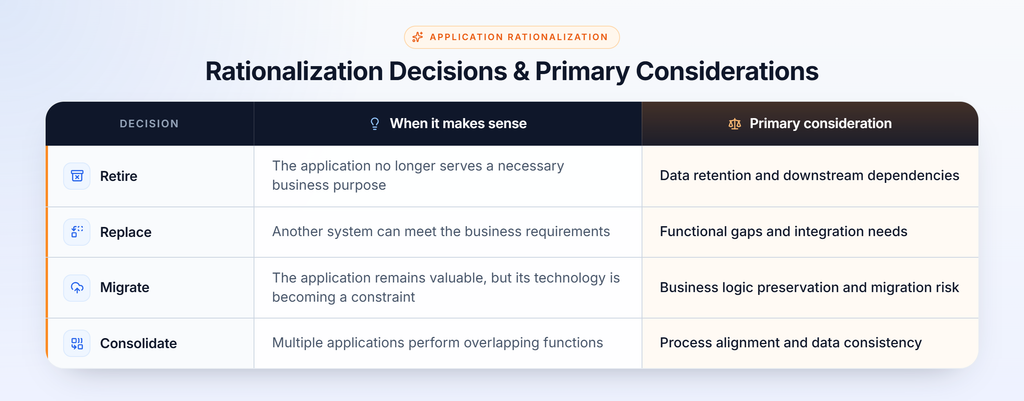
For example, a legacy reporting tool may be retired if its reports are available through an existing business intelligence platform. However, a custom application that manages complex pricing rules or critical operational workflows may require migration because its underlying business logic remains essential.
The objective is to select the approach that preserves business value without carrying unnecessary technical debt into the future.
Application retirement requires more than switching off a server. Organizations must understand what the application does, who depends on it, and what information must remain accessible.
A practical assessment should cover four areas:
Gartner highlights data retention schedules and business or compliance access requirements as important considerations in application retirement. This assessment is particularly important for older systems built with technologies such as Visual FoxPro, VB6, Classic ASP, or COBOL, where undocumented dependencies can make the true scope of retirement difficult to establish.
Retiring an application does not necessarily eliminate the need for technical work. Historical data may need to be migrated to an archive, business functions may need to be transferred, and integrations may need to be redirected.
For example, an organization retiring a legacy inventory application may still need to preserve transaction history for audits and reporting. The application can be decommissioned only after the required data is accessible through an approved alternative.
When an application remains business-critical, a structured legacy application migration approach can help teams plan the transition, preserve important functionality, and reduce disruption.
Before approving retirement, replacement, or migration, organizations should document the decision and its supporting evidence.
A useful framework includes:
This approach helps organizations avoid two costly mistakes: migrating applications that no longer need to exist and retiring systems whose functions remain essential.
The right legacy modernization strategy is not always migration. Some applications should be retained and modernized, while others may be replaced, consolidated, or retired.
The decision depends on business value, technical dependencies, data obligations, and the total cost of each option. A structured assessment helps organizations direct modernization investment toward applications that genuinely support future business needs.
1. When should a legacy application be retired instead of migrated?
Retirement may be appropriate when an application no longer supports a necessary business process, duplicates existing functionality, or costs more to maintain than its business value justifies.
2. What is the difference between application retirement and migration?
Application retirement involves decommissioning an application after addressing its data and dependency requirements. Migration transfers its required functionality or data to another platform or environment.
3. Can a legacy application be retired without migrating its data?
Not always. Data retention, audit requirements, contractual obligations, and business access needs must be assessed before data is deleted or archived.
4. How can businesses decide which legacy applications to modernize first?
Evaluate business criticality, maintenance costs, security risks, dependencies, user needs, and modernization feasibility. Prioritize applications where the expected business benefits justify the investment.