For many years, Microsoft Visual FoxPro (VFP) was an industry leader in terms of development of data-centric desktop applications. It was extremely fast with a local data engine, and had a close integration with the UI-to-database model, making it a popular choice among developers. But, since Microsoft has discontinued all support for VFP 9.0 in 2015, it’s no longer viable to run mission-critical business systems on a 32 bit legacy platform.
Moving to the new .NET ecosystem (such as .NET 8 or .NET 9) is the logical next step to ensure security, scalability, cloud readiness, and cross-platform compatibility. However, when migrating from VFP to .NET isn’t a simple “copy-paste” rewrite. It calls for a paradigm shift.
Knowing the special hazards associated with a VFP-to-.NET migration is the first step to a successful transformation. Let’s look at the most frequent mistakes and tips to prevent them.
Whitepaper—VB6 End-of-Life Risks: What Enterprises Must Know
This whitepaper outlines the compounding technical, security, financial, and operational risks of maintaining legacy VB6 applications in a 2026 threat environment and provides a strategic roadmap for enterprise modernization.
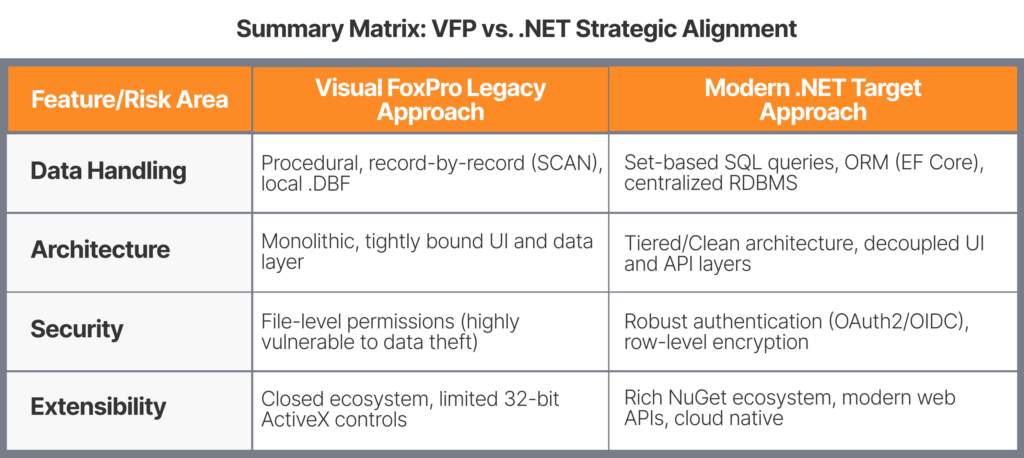
Visual FoxPro is structurally unique in a number of ways. It confuses the user interface, the business logic and the database. VFP commands enable developers to use local cursors and other commands such as SEEK, LOCATE and SCAN to manipulate data directly in a form UI.
Modern .NET applications are built on a strictly decoupled architecture, such as a Model-View-Controller (MVC) architecture or the MVVM (Model-View-ViewModel) or clean/onion architecture. Stoically trying to make a line-by-line “translation” of VFP code to C# will lead to an unmaintainable, poorly performing .NET code that is similar to legacy technical debt rather than using modern software patterns.
How to Avoid It:
Decouple Business Logic Early: Prior to writing any .NET code, identify the main business processes of the application. Isolate Database logic from the user interface logic.
Adopt ORMs Wisely: Adopt an ORM – but use Entity Framework Core (EF Core) and model data based on good RDBMS practices instead of VFP’s local table layout.
Focus on Capabilities, Not Code: Revise the application according to the business needs for today, rather than how VFP did it 30 years ago.
2. Severe Data Paradigm Misalignment
The Risk: Overlooking the DBF-to-SQL Transition
VFP utilizes native .DBF files. Data manipulation occurs in RAM, enabling record by record processing to be very rapid on a local machine. On the other hand, .NET applications are usually deployed to a central Relational Database Management System (RDBMS) such as Microsoft SQL Server or PostgreSQL and communicate with it through a network using TCP/IP connections.
If a developer inserts C# code to move millions of records over the network for local loops, as in the case of a VFP SCAN…ENDSCAN, the performance of the application will suffer and the network will choke.
How to Avoid It:
Shift to Set-Based Logic: Migrate VFP’s record-at-a-time data manipulation to set based T-SQL queries, stored procedures or optimized EF Core LINQ queries running on the database server.
Data Migration Planning: Plan for data cleaning. Corrupted dates (such as blank or bogus string dates) and poor data integrity are a problem in VFP tables because foreign keys are not tightly enforced. Cleanse your .DBF data prior to the ETL (Extract, Transform, Load) scripts to SQL Server.
Leverage Indexing: Make sure that your target SQL database is properly indexed to replace the lightning fast native VFP .CDX index files.
3. Scope Creep and “While We Are At It” Syndrome
The Risk: Attempting to modernise and rebuild everything all at once
Legacy systems have already been around for years and there will be plenty of new features, UI changes and integrations that users and stakeholders are hoping for. Migrating to new software at the same time attempting to change the user experience, resolve legacy bugs, optimize cloud functionality, and update the framework is one of the main reasons that software migrations are unsuccessful or take years to complete.
How to Avoid It:
Phase 1: Functional Equivalence: The “Minimum Viable Migration” is a functional equivalence phase where you will focus on the basics. Ensure the new .NET system processes the core business logic in much the same way as the old system, accuracy of data first.
Establish a Strict Change Control Board (CCB): Hard freeze new feature requests until the core application is migrated & stabilized in production.
Component-by-Component Migration: If the system is massive, consider a hybrid approach. Use Interop technologies or microservices to migrate specific modules to .NET while keeping other parts in VFP temporarily, gradually phasing out the legacy system.
4. Loss of Undocumented Tribal Knowledge
The Risk: Missing Embedded Business Rules
The typical VFP system is 20-30 years old. Decades of developer team changes means that documentation often gets lost along the way. Important company logic, formulas and taxation rules reside in hidden methods on forms, data validation snippets, or triggers inside of database tables that no one in the organization currently knows about.
How to Avoid It:
Automated Code Analysis: Analyze project dependency with static code analysis tools specifically designed for VFP; discover dead code (code that is never run) and uncover hidden validation logic.
User-Driven Requirements Gathering: Meet with the power users to capture what they really do in their day to day tasks. In many cases, the software is doing tasks that users aren’t using it for, or the users have manual ways to work around tasks that the software isn’t doing.
Comprehensive Test Suites: Develop a test matrix of inputs and outputs using production data. Pass the same sets of data through both the VFP and new .NET systems to check the outputs are exact.
5. UI and UX Disconnect
The Risk: Losing the Core User Base
VFP interfaces are optimized for quick data entry with a lot of keyboard control features (for instance, pressing Enter will move between fields instead of pressing Tab) and a lot of information crammed into a small space. Without preparing the users for the new web application or touch-friendly desktop UI, data entry speeds may decrease, causing a great deal of user frustration and resistance to the new system.
How to Avoid It:
Choose the Right Target UI Framework: f users need dense data grids and fast keyboard shortcuts, consider using a desktop framework such as WPF (Windows Presentation Foundation) or WinForms on a recent .NET may be more suitable than SPA (Single Page Application) Web. Where web is necessary, make sure to develop with keyboard accessibility in mind.
Preserve Key Keyboard UX: Programmatically map familiar VFP hotkeys and enter-key behaviors into the new .NET interface to minimize the learning curve for data-entry staff.
Final Thoughts: A Roadmap to Success
Migrating from FoxPro to .NET is a major business investment, but treating it purely as an IT cost or a basic code translation is a recipe for project delays. Leadership can establish the right timelines and budgets when they understand that the most significant challenges involved are structural changes in the architecture, network changes to the flow of data and scope management.
The most successful migrations are those that treat the legacy VFP application as a highly accurate blueprint for business rules, while treating .NET as a clean slate to build a modern, scalable, secure enterprise platform for the future.
Whitepaper—VB6 End-of-Life Risks: What Enterprises Must Know
This whitepaper outlines the compounding technical, security, financial, and operational risks of maintaining legacy VB6 applications in a 2026 threat environment and provides a strategic roadmap for enterprise modernization.
Joe Rafanelli is the Director of Migration Services at Innovatix Technology Partners, a Macrosoft, Inc. company. In this capacity, Joe acts as the single point of contact for Innovatix’s migration solutions. Additionally, he collaborates with internal technology analysts to understand requirements, work scope, and maintain client relationships ensuring their satisfaction .
Prior to joining Innovatix in May 2017, Joe had a resplendent career in the Banking Industry spanning 25 years. He focused on Account Management, Project Management, Implementation Management, and Product Development for companies like JPMorgan, Citigroup and Brown Brother Harriman.
Joe is excellent at improving the client experience by driving change management projects to completion. Joe has B.S. Finance, MBA Investment Finance, Project Management certificate & Database Management certificate.